EmailShot Smart Chips for Google Docs, Slides & Sheets
When you paste an EmailShot URL into a Google Doc, Slide, or Sheet, Google offers to convert it into a Smart Chip — a compact, interactive element that shows a preview of the email when hovered. This makes it easy to reference email content in documents without pasting long URLs or screenshots.
What are EmailShot Smart Chips?
EmailShot Smart Chips are interactive elements that represent email screenshots in Google Workspace applications. They provide a compact, visually appealing way to include email content in your documents, presentations, and spreadsheets.
Benefits of Using EmailShot Smart Chips
- Quick Preview: Hover over a Smart Chip to instantly view a preview of the email screenshot without leaving your document.
- Space-Saving: Replace long URLs with compact, easily recognizable chips.
- Professional Appearance: Enhance the look of your documents with sleek, uniform representations of email content.
- Improved Collaboration: Team members can quickly access relevant email information directly from shared documents.
- Seamless Integration: Smart Chips work natively within Google Workspace, ensuring a smooth user experience.
How to Insert EmailShot Smart Chips
Inserting EmailShot Smart Chips is simple and intuitive:
- Copy an EmailShot URL
- Paste the URL into your Google Doc, Slide, or Sheet
- Google will prompt you to replace the link with a Smart Chip
- Click "Replace" to insert the Smart Chip
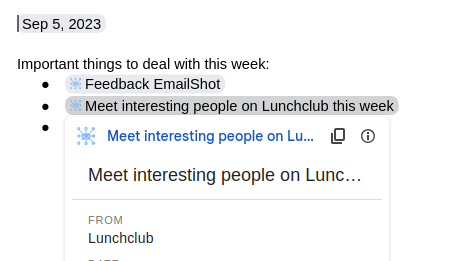
Smart Chip Features
When you insert an EmailShot Smart Chip, you'll notice:
- An icon representing an email screenshot
- A short title or description of the email content
- A preview card that appears when hovering over the chip
These features make it easy to quickly reference and share important email information within your Google Workspace documents.
For more information on Smart Chips, visit the official Google support page.